 Pros:
Pros: Powerful standard technology, gorgeous display, full keyboard with number pad, great connectivity (ports) options
Cons: Expensive, terrible battery life, runs hot
| Specs | Envy 17 |
| Processor | Intel Core i7-720QM (1.6-2.8GHz) |
| OS | Windows 7 Home Premium 64-bit |
| Memory | 4GB DDR3 |
| Graphics | ATI Mobility Radeon HD 5850 1GB |
| Storage | Dual 320GB 7200rpm |
| Display | 17.3-inch HD+ BrightView Infinity with LED backlight (1600×900) |
| Optical | Slot-loading SuperMulti DVDRW |
| Ports | (2) USB 2.0, (1) eSATA/USB combo
(1) USB 3.0
Mini DisplayPort, VGA, HDMI Gigabit Ethernet 5-in-1 card reader |
| Dimensions | 16.4 x 10.8 x 1.25-1.52 inches (6-cell) |
| Weight | 6-cell: 7.51 lbs |
| Price | $1399 as tested |
The Hewlett-Packard Envy 17 is the company’s most powerful and expensive laptop currently on the market, now that the beastly HDX is no longer in the picture. Of the three different Envy’s, the Envy 17 is the newest model to be released, although the first Envy’s (different than the earlier Voodoo Envy) were introduced in late 2009. The Envy line focuses on high-performance in a mobile package, and the Envy 17 is the biggest laptop in the family. Can it maintain its performance pedigree while tackling the issues of price and power consumption? Read on to find out what we learned about HP’s high-performance notebook with an equally impressive sticker price.
DesignThe Envy’s exterior is covered in brushed aluminum with etched shapes that provide a textured feel. With its spacious 17.3-inch screen and integrated optical drive, a feature other Envy’s don’t have, the Envy 17 is no lightweight at 7.51 lbs (3.41kg). Fortunately, the Envy’s classy design evokes more heft than heavy, since the weight is well-distributed.

An issue we had with the Envy 17 was its illuminated HP logo on the outer lid. The metal lettering on the logo is prone to catching on objects and bending, especially when being removed from a laptop case. While this is a minor snag, a luxury-branded product shouldn’t suffer from such build quality issues.
Keyboard/TouchpadMaking the best use of the extra girth from the 17-inch display, HP included a full size keyboard and number pad; to which we say kudos! It uses the island-style design which raises and separates the keys out of the chassis. As with the other Envy 13 we reviewed, the 17′s keyboard has a good tactile typing experience. The layout is fairly standard, but touch typists will lament the small arrow keys and the non-standard Function keys.

With most laptops, the Function keys have a secondary function, beyond what the default Windows actions, which are enabled with the Fn key. HP has done the opposite here: the secondary functions like screen brightness, video output, and multimedia playback are the commands issued when you press the F-key. Do you use F5 to refresh a webpage? Now you have to Fn+F5 (or the other standby, Ctrl+R). For those used to the usual F-key functions, you can thankfully change this in the BIOS.
The touchpad on the Envy is a uniform surface that does not have separate buttons, although the surface is clickable like the display on a Blackberry Storm. It provides a pleasant tactile experience and is quite responsive.
 Display
The 17.3″ display is an HP BrightView Infinity with LED backlighting and HD+ resolution. It has a native resolution of 1600 x 900, which is more than enough for a 17″ screen. HP’s BrightView displays are top notch, as we saw in both the Envy 13 and Envy 15. The colors are amazingly vibrant and brightness is sufficient for most environments. The screen is also recessed into the lid, creating a lip that provides a bit more secure closing since there is no conventional latch. Unfortunately in bright lights or outdoor environments, the display is difficult to read since it doesn’t deliver the excessive brightness reserved for laptop screens and solar flares.
HP also offers an Ultra BrightView option which bumps the resolution to 1920 x 1080, which isn’t terribly expensive at a $100 additional cost over the 1600×900 version.
Connectivity & Ports 
Left side: fan vent, VGA port, Ethernet, DisplayPort, HDMI port, eSATA port, USB port, mic input, headphone output

Right side: lock slot, AC plug, slot-loading DVD-RW drive, 5-in-1 card reader, two USB ports
Multimedia
HP is putting a lot of advertising into the “Beats by Dre” audio technology in their higher end laptops, including the Envy 17. Beats is a collaboration by HP and Dr. Dre to deliver sound “up to the level that musicians hear in the studio.” Essentially it’s audio optimization technology, the specifics of which are difficult to track down. HP also provides a nifty console equalizer if you like to tweak your audio. The speakers are produced by Altec Lansing, although they’re much louder than your average Altec speakers. The quality is about on par with most laptops, offering decent sound but little bass to speak of.

The Envy 17 is also equipped to connect to almost any external display, with one caveat. You get the standard VGA and an HDMI output, but a Mini DisplayPort makes the trifecta. While DisplayPort is less common and the Mini version requires an adapter, it can be adapted to VGA, HDMI or full DisplayPort which adds some nice flexibility.
As an outright portable multimedia experience, the Envy 17 will be difficult to top. It delivers a large, high quality viewing area with vibrant images, solid audio, and an optional Blu-ray drive. As we mentioned previously, the machine has both HDMI and DisplayPort outputs, which means there’s nothing standing between you and streaming Fast Times at Ridgemont High on four 1080p displays at your backyard barbeque.
 Battery Life
This machine comes standard with a 6-cell battery, with a 9-cell option that will stick out of the chassis. Between the huge display, power-hungry Core i7 chip and ATI Graphics, we achieved a meager two hours on this battery once it was removed from a power source. This is actually just shy of HP’s 2.5 hour estimate, which goes up to 3.75 hours on the 9-cell option. Even given generous estimates, the 9-cell battery doesn’t get the Envy 17 very far from a power outlet.
Our standard battery session includes everyday actions like web browsing, word processing, and watching video clips. Brightness is set to the minimum comfortable viewing level, and wireless cards are constantly active. This doesn’t include heavy use of the optical drive, given most people don’t spend lots of time spinning up the drive on battery.
As you can judge from the battery life, this beast uses a lot of power, which means it generates a lot of heat. With a relatively thin 1.25-inch chassis, there is not much room for the heat to dissipate and it heats up the aluminum chassis very well. Not only do you have to stay close to an outlet with the meager battery life, but you need to be careful if you intend to keep the Envy 17 in your lap.
 HP QuickWeb
I wanted to take some time to talk about HP’s new QuickWeb feature, since I think we’ll be seeing this appear on a number of HP models in the near future. QuickWeb is an alternate, quick-booting operating system option, which is selected as default when you start up the Envy 17. With QuickWeb active, it will boot up instead of Windows 7 when you press the power button. From there, you’re given a screen that allows you to surf the web, check email, listen to music, even check out saved photos. All of this is available about 30 seconds after you turn the laptop on, instead of waiting for the entire boot sequence. Although the idea itself is sound, implementation is poor for the following reasons.
First, QuickWeb resolution is terrible, and working on a laptop is very much an aesthetic exercise as well as a professional one. It’s an ugly interface that, understandably, is hamstrung by running outside of Windows. Secondly, the Envy 17 is a poor match for HP QuickWeb. Sure, it’s a laptop, but it doesn’t have the mobility where you can say, “Ooh, let me pop my laptop open and find that photo you wanted to see.” It’s too much laptop to use casually. Lastly, it requires manual setup instead of pulling important networking data from Windows, which is troublesome considering how networking can seem a twisted marriage of science and dark magic to the uninitiated. A word of advice to HP: If you want QuickWeb to show its full potential, make it as easy to use as the name implies, and make it look like an HP creation, instead of a welcome screen that’s lifted from a 20 year old program.
 Conclusion
The HP Envy 17 is a powerful laptop that’s perfect as a desktop replacement or a portable LAN party gaming rig (if people still do that). Once you get past the $1,399.99 sticker shock, you realize that the base unit comes with nearly quite a lot of features, like an Intel Core i5 processor, 64-bit Windows Home Premium, 4GB of DDR3 RAM, 500GB storage, a 1GB ATI video card, wireless-N, and a slot-loading DVD-RW. Power users may want to upgrade to an i7 processor (+$300) and expand to the 8GB RAM (+$200) capacity, which brings the grand total to $1,899.99. It’s a premium price, but you get some of the best components currently available in a portable form factor.
However if you need to be able to run on the battery at all, you’re better off looking for something more thrifty. There is also the issue of the heat buildup, which makes using the Envy 17 in your lap troublesome. If neither of these are an issue and you are lusting for a gorgeous 17-inch display, this is your ticket.
The Envy 17 is an excellent laptop. HP has been making strides in build quality over the past few years, which we’ve been seeing in the new HP Mini 210 Vivienne Tam Edition and the HP dm4. The Envy line is no exception, and if you haven’t taken a look at any of HP’s offerings in the past few years, you may want to take a second glance.


 Functionally, there is little to differentiate the HP Pavilion dv2600 from the older dv2500 mode. Both are portable entertainment machines with a nice array of touch-sensitive multimedia controls and compatibility with the xb3000 expansion base. Digging a little deeper into the specification sheets, however, will uncover that the dv2600 uses the new range of Intel's T7000 series Core 2 Duo chip and that the memory can be upgraded to a maximum of 4GB (the dv2500 can accept only 2GB). There is even an option for a large 250GB harddisk in selected models.
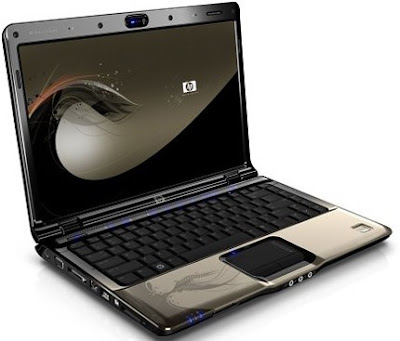 Looks aside, the Pavilion dv2600 has the performance needed to deliver quality entertainment. It's Core 2 Duo processor and discrete Nvidia graphics card allows high-definition content to be rendered with ease. There is even a mini remote control for use when the unit is at a distance. The Altec Lansing speakers give better audio output than most other thin-and-light units, though there are two headphone jacks (one of which is S/PDIF-compatible) for hooking up to external horns.


