Friday, September 3, 2010

0 comments
DELL LAPTOP
The Dell Inspiron 1420 (R510304) Laptop PC is powered by 1.67 GHz Intel Core 2 Duo Processor T5450 and it features 14.1 inch WXGA widescreen TFT display, Dell Wireless 1390 802.11a/g/n Mini-Card wireless connection, integrated 2.0 Megapixel webcam, and 8X Super Multi DVD Writer.
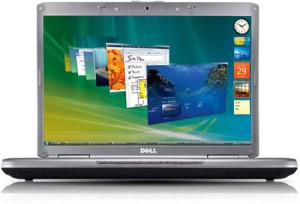
 
Dell-inspiron-1420-laptopThe Dell Inspiron 1420 (R510304) laptop is built on Intel ?Santa Rosa? notebook platform and it is powered by 1.67 GHz Intel Core 2 Duo Processor T5450 having 2-MB L2 Cache and 667Mhz FSB and it features 1-GB Dual Channel DDR2 SDRAM at 667MHz (maximum 4-GB), 160-GB 5400 rpm 2.5 inch SATA Hard Drive and 8X DVD Super Multi Double Layer (8.5 GB) DVD Writer as standard configuration.
Dell Inspiron 1420 laptop PC sports anti-glare, widescreen 14.1-inch (35.8 cms) WXGA+ TFT Display with TrueLife technology which can provide upto 1280 x 800 pixels resolution (or optional 1920?1200 screen resolution) powered by NVIDIA GeForceTM Go 8400M graphics, 128MB DDR3 dedicated graphic memory.
The Dell Inspiron 1420 laptop PC offers a wide range of component upgrades – including integrated WWAN or a Blu-ray DVD burner optical drive – and offers color choices for typical home users to suit budget and applications. For example. besides standard black and white colors, the new Inspiron 1420 series also comes in red, blue, green, yellow, brown, and pink colors.
With Dell MediaDirect, one can have fast, easy one-button access to movies, music, photos, & Microsoft Office content without starting Microsoft Windows!
Genuine Windows Vista Home Basic OS preinstalled Dell Inspiron 1420 series of laptop PC for networking offers Dell Wireless 1390 802.11a/g/n Mini-Card for wireless networking, and comes with internal 56 kbps Fax/Modem connection along with internal 10/100 Ethernet LAN connection and an optional EVDO and HSDPA wireless broadband connections.
Dell Inspiron 1420 laptop has 4 USB v2.0 high speed ports, Firewire IEEE 1394a, an 8-in-1 media card reader, an optional Infrared, an optional Bluetooth v2.0 connection, S-Video TV-out, standard VGA out port, and an empty ExpressCard 54mm slot.
The Dell Inspiron 1420 laptop also ports integrated 2.0 megapixel webcam with 2 built-in stereo microphones for video chatting.
Dell Inspiron 1420 laptop comes with several software including Dell MediaDirect which allows one-button access to movies, calendar, contacts and presentations, without waiting for your operating system to start up and Video Communications Pack which allows Chat with friends and family with integrated 2 megapixel webcam dual digital microphones and earbuds.
Weighing 3.45 Kgs (with combo drive and battery pack) the Dell Inspiron 1420 laptop PC comes with 6-cell 56Whr Lithium Ion Battery which can provide upto 2.5 hrs of backup (without Wi-Fi).
I/O Ports:
* 4 USB v2.0 ports
* IEEE1394a
* ExpressCard 54mm Slot
* 8-in-1 Memory Card Reader
* VGA video output – external monitor
* S-Video TV-Out
* RJ45 – Integrated 10/100 LAN
* RJ11 – Integrated 56K Modem
* Stereo in Jack
* Headphone/speaker out jack
* Dual digital mics
* PCMCIA Port

Thursday, September 2, 2010

Core i3 Gaming Laptop Reviews

0 comments
Core i3 Gaming Laptop – SAMSUNG NP-R580-JS03UK Notebook Reviews SAMSUNG NP-R580-JS03UK CORE i3 330M 3GB 320GB NOTEBOOK With its unique Touch of Colour finish and crystal S design, the R580 looks as good as it performs. Samsung do not think that its too much to expect your mobile computers appearance to reflect its performance and that is why the R580 boasts a new high end design that parallels its high performance features such as the 16:9 HD LED display that delivers sharp images and bold colours.
samsungnpr580js03ukfirst_s
Highlighted by its new Touch of Colour finish, an appealing crystal S pattern, and a durable casing engineered to reduce the risk of scratches and fingerprints, the R580JS03UK makes sure your on the go lifestyle stays stylish. And with touchpad lighting, a low profile keyboard and a 17 key numeric keyboard, using it is as enjoyable as it is productive.
Youll love Windows 7 because it makes the things you do with your PC every day faster and easier ,so there are fewer steps between you and what you want to do. Simplifies everyday tasks: Easier navigation, simpler home networking, improved device capabilities, and faster Web browsing with Windows Internet Explorer 8 makes your life easier, and computing experience more fun. Safeguard Your Work: Your important data faces serious threats – from data loss and spyware, to outright theft of information. Windows 7 strong security foundation and features helps protect users and systems against malware and other forms of security threats. Makes new things possible: Windows 7 provides more choices for how you can interact with your PC, making it easier for you to enjoy photos, music, and video from almost anywhere.
samsungnpr580js03uksecond_s
Because a life on the go can often trip you up, the SAMSUNG R580 was crafted to not let you down. In fact, its high quality craftsmanship extends as much to its exterior as to its high performance inner workings. Built to withstand bumps and knocks, the R580 comes with a robust, durable casing designed to keep its contents safe and sound as well as reduce the risk of scratches and fingerprints. And its ergonomic, stylish design makes it as coolly eye-catching as it is reliable
The R580 features the latest NVIDIA GeForce N11P-GE graphics card for an exceptional video and gaming experience. Its advanced 3D graphics processing power and dedicated 512MB gDDR3 memory provide outstanding graphic performance, so you can enjoy state-of-the-art 3D computer games and High Definition (HD) movies with incredible performance and fidelity.
The R580s 16:9 aspect ratio immerses you in games and movies with an accurate representation – so you dont have annoying black bands crowding your picture. Youll watch movies the way they were meant to be seen. And see images that are fine-tuned with the sharpest details and boldest colors on a 15.6″ HD LED display. An added bonus? It uses less power, so you can be entertained longer. Get more out of your on-the-go entertainment and enjoy a bigger, better picture.
Pack one less cord (or forget one less) on your next trip. The R580 lets you charge many of your mobile devices right through its USB charging port. And the R580 doesn’t even have to be powered up. Go ahead, anytime, anywhere. Recharge your phone, your MP3 player and while you’re at it, yourself
Computing on the move does not get much better than this!

Pink laptop by Dell

0 comments
My fiancee’s laptop finally gave up the ghost a couple of weeks ago – in exactly the same manner as mine, the power socket broke and the cost of fixing it was a bit much. I figured that money would be better spent invested in a new laptop. The Missus wanted a pink one, to go with her pink phone, pink iPod, pink Nintendo DS, etc… it’s a girly thing, I don’t get it. And Apple have a lot to answer for: remember when gadgets were silver or maybe black? Anyway, I use a Dell laptop these days and I couldn’t be happier with it. It’s robust, it’s expensive but value for money and it’s lasted. So, having found out they do a pink version of their Inspiron laptops I figured, why not? So I ordered her the pink Dell laptop thinking it would be an average laptop with a gimmicky colour but hey, it’s a Dell so it’s not a complete waste of money.
Pink Dell laptop
And then it arrived. It’s beautiful! OK, personally I’d prefer it in another colour – they do 7 others – but this is really a nice machine. Guys, buy one for your girlfriend/wife/mistress and she’ll love you forever.
The best of the rest
There are other laptops on the market with a pink or “choose your own colour” gimmick. The specs of the Dell are great, the price is reasonable, but the only thing some buyers might find disappointing is that it isn’t pink all over, i.e. it’s just the screen over that’s pink, the rest is silver. But actually, that looks a lot better than the other models where the whole case has been sprayed a hideous shade of bubblegum pink. The Dell is classy. If I had to get a different one, here’s what I’d go for:
VAIO CR Series Notebook VGN-CR290EAP VAIO CR Series Notebook VGN-CR290EAP Make a unique fashion statement with the with the drop-dead gorgeous VAIO CR notebook dressed in Cosmopolitan Pink. Featuring a stunning 14.1″ widescreen LCD with XBRITE-ECO? LCD technology, this thin-and-light style icon is an astonishing sight to behold. Backed by the Windows Vista operating system and Intel Centrino Duo processor technology with Intel Core? 2 Duo processor, this lightning-fast, super-powerful mobile notebook is packed with entertainment and design extras. From a built-in web cam and AV controls to its unique color and comfortable, easy-to-clean keyboard, the remarkable VAIO CR notebook delivers entertainment, power and pizzazz.
Computers VAIO Notebooks VGN-CR290EAP

Samsung's Galaxy Tab Runs Froyo, Has Flash and Measures 7 Inches

0 comments
Samsung's Galaxy Tab Runs Froyo, Has Flash and Measures 7 Inches
It was possibly the worst-kept secret in tablet-land (more so than the iPad), but the final specs have now been revealed for the Samsung Galaxy Tab. It'll run Android 2.2 (Froyo) and comes in a 7-inch flavor—for now.
It's one of those moments where the final product actually exceeds expectations based on previous leaks. Sure, a lot of the specs we had heard before, but did you know the Galaxy Tab was going to be the first-ever DivX certified tablet?
We're pretty sure there'll be other tablet sizes coming at a later date from Samsung, but this particular GT-P1000 model has a 7-inch TFT-LCD WSVGA screen (with 1024 x 600 pixels), and is powered by a Cortex A8 1.0GHz processor and a PowerVR SGX540 GPU—the same one used in their Galaxy S phone-and runs with 512MB of RAM.
As expected, the back-facing camera is a 3MP affair with auto-focus and an LED flash, and the forward-facing one (for video conferencing) has a 1.3MP sensor. In some of Samsung's comedy lifestyle photos below, you'll see that back-facing camera being used for the Layar app. I'm not sure it's going to be any more convenient than using your phone, but it's most certainly a welcome addition.
Two storage capacities are on offer, either 16GB or 32GB, with both models allowing for a further 32GB memory expansion via the card slot.
Several connectivity options have been included, such as Wi-Fi 802.11n and Bluetooth 3.0, and 3G support should a user want to use data with one of the supporting carriers (Vodafone has been signed up from the get-go.)
As we saw in the leaked video last week, there's a 30-pin connector port, similar to what Apple uses for its gadgets.
The one elephant in the room is the fact that Samsung's slicked its TouchWiz UI on over the top of Froyo. I'm not a fan of it on their phones, but will wait until a hands-on session with the tablet before I pass judgment on its usage here.
A Readers Hub, Media Hub, Music Hub and Social Hub act as dedicated areas for particular uses—like fancy folders, if you will. In addition to loading up the Android Market, it also has access to Samsung's Apps market for tablet apps. The Gyroscope, Geo-magnetic sensor, accelerometer, and light sensor could provide for some very interesting apps.
Full details in the press release below, with the Galaxy Tab on sale in Europe mid-September, and the US/other areas of the world later in the year. [via T3]
Update: Head here for our hands-on with the Galaxy Tab.
Add caption
Berlin, Germany, September 2nd, 2010 – Samsung Electronics Co., Ltd, a global leader in mobile technology, today announced the launch of the Samsung GALAXY Tab (Model: GT-P1000). Powered by Android Operating System 2.2, the Samsung GALAXY Tab is the first of the company's tablet devices, representing a new category of mobile products for Samsung.
The Samsung GALAXY Tab brings together all of Samsung's leading innovations to provide users with more capabilities while on the move. Consumers are able to experience PC-like web-browsing and enjoy all forms of multimedia content on the perfectly sized 7-inch display, wherever they go. Moreover, users can continuously communicate via e-mail, voice and video call, SMS/MMS or social network with the optimized user interface.
"Samsung recognizes the tremendous growth potential in this newly created market and we believe that the Samsung GALAXY Tab brings a unique and open proposition to market. There is a new and emerging consumer demand that Samsung can satisfy since mobile is in our DNA. This demand continues to grow and develop as users tap its limitless potential," said JK Shin, President and Head of Mobile Communications Business, Samsung Electronics. "The Samsung GALAXY Tab has been designed to enable consumers to maximize their online experience wherever that may be. The Samsung GALAXY Tab is pushing the market in new directions and Samsung believes this is only the beginning of its innovations as pioneers in smart media devices."
A new concept of mobility for media
As a new category of device, the Samsung GALAXY Tab brings a wealth of mobile experiences. Its striking 7" TFT-LCD display delivers exciting mobile experience for watching films, viewing pictures, e-reading or sharing documents. In design, its light (380g) build provides perfect portability, with its svelte dimensions making it easy to grip and use. Supporting the latest Adobe Flash Player 10.1, the Samsung GALAXY Tab fully supports swift, seamless viewing of every single page of the web.
The ‘Readers Hub,' Samsung's unique e-reading application, provides easy access to a vast digital library – from classical literature to the latest bestsellers and reference materials. At the same time, Samsung unveils ‘Media Hub,' a gateway to a world of films and videos, and ‘Music Hub,' an application giving access to a wide range of music tunes.
The Samsung GALAXY Tab has made rich communication truly mobile; it presents a level of converged technology that moves beyond mobile or PC to an entirely new category. Users have new powers to consume, create and communicate from wherever they are.
Powerful, always-on communication
With 3G HSPA connectivity, 802.11n Wi-Fi, and Bluetooth® 3.0, the Samsung GALAXY Tab enhances users' mobile communication on a whole new level. Video conferencing and push email on the large 7-inch display make communication more smooth and efficient. For voice telephony, the Samsung GALAXY Tab turns out to be a perfect speakerphone on the desk, or a mobile phone on the move via Bluetooth® headset.
Powered by a Cortex A8 1.0GHz application processor, the Samsung GALAXY Tab is designed to deliver high performance whenever and wherever you are. At the same time, HD video contents are supported by a wide range of multimedia formats (DivX, XviD, MPEG4, H.263, H.264 and more), which maximizes the joy of entertainment.
While the front-facing camera allows face-to-face video telephony over 3G, the rear-facing camera captures still images and video that you can edit, upload and share, all without any hassle. As online content explodes, the Samsung GALAXY Tab is the best portable solution for every lifestyle that needs a constant connection.
The Samsung GALAXY Tab will be launched in Europe in mid September, and in other markets including Korea, the US and Asia in coming months. .
Applications of the Samsung GALAXY Tab
The Samsung GALAXY Tab is packed with services to complement and enhance your life in different ways. Access to Android Marketplace lets users download apps and personalize their device infinitely. In addition, there are pre-loaded applications uniquely designed and optimized for Samsung smart phones and smart media devices.
Readers Hub – Samsung Readers Hub consolidates e-reading applications such as eBooks, magazines, and newspapers. Users can enjoy ‘reading' with unified and intuitive user experience powered by global eReading service leaders, Kobo, PressDisplay and Zinio. More than 2 million books including today's best sellers, over 2,500 titles of magazines in 20 languages and more than 1,600 newspapers in 47 languages are available at launch and will grow the library gradually.
Google Mobile Services – Services like Google Maps™ Navigation (Beta) and Google Goggles are available on Google's Android platform. With useful location-based services like Google Maps, consumers can search in Standard English instead of entering an exact address. A search-by-voice function is just as intuitive, meaning searches can also be completed easily on the go. Google Goggles is a powerful, visual search tool that uses the Samsung GALAXY Tab's camera to uncover information – an image of a landmark or artwork is automatically used to perform a search, delivering relevant content like a description or history. In addition, with a camera, users can enjoy various augmented reality services which are downloadable in the application market.
More applications will be available from Samsung Apps.
The Samsung GALAXY Tab (GT-P1000) Product Specifications
Network
2.5G (GSM/ GPRS/ EDGE) : 850 / 900 / 1800 / 1900 MHz
3G (HSUPA 5.76Mbps, HSDPA 7.2Mbps) : 900 / 1900 / 2100 MHz
OS
Android 2.2 (Froyo)
Display
7.0 inch TFT-LCD, WSVGA (1024 x 600)
Processor
Cortex A8 1.0GHz Application Processor with PowerVR SGX540
Camera
3 MP Camera with Auto-Focus and LED Flash
1.3MP front camera for Video Telephony
Value-added
Features
Android Market™ and Samsung Apps for more applications and contents
Readers Hub, Media Hub* , Music Hub*, Social Hub
*Availability will be decided by market preference.
Adobe Flash 10.1 player support
Full HD video playback, Thinkfree Office, Swype, Hybrid Widget
Connectivity
30 pin connector
WiFi 802.11n / Bluetooth® 3.0
Sensor
Gyroscope sensor, Geo-magnetic sensor, Accelerometer, Light sensor
Memory
16G / 32G internal memory with up to 32G external memory slot
RAM: 512 MB
Size
190.09 x 120.45 x 11.98mm, 380g
Battery
4,000mAh (7 hour movie play)

All the Cool New Stuff From Apple Today

0 comments
All the Cool New Stuff From Apple Today
Apple's music event was so full of shiny gadgets and awesome news that your head might still be spinning. In case you struggled to keep up with everything or want a review

It's Time To Make Standardized Ratings For Gadgets

0 comments
It's Time To Make Standardized Ratings For GadgetsEarlier today, the Environmental Protection Agency and National Highway Traffic Safety Administration showed off stickers that would give car buyers standardized info on a particular model's fuel economy and environmental impact. Gadgets should have standardized ratings, too.
It's Time To Make Standardized Ratings For Gadgets When buying gadgets, comparison is paramount. There are inevitably a hundred TVs that fit the general requirements you've set out, a few dozen Blu-ray players, and a handful of smartphones. In many cases, it ends up being a process of elimination, and standardized gadget ratings would ensure that that process was a fair and informed one.
As our society comes to terms with the direness of our energy situation, and as the idea of "green" transforms from buzzy marketing bullshit to something that our gadgets actually have to be, it will be essential to have real, digestible data on how the electronics we use impact the environment. Some considerations here could include:
Power consumption: how much gadgets use when they're plugged in and operating; how much they use when they're plugged in and not being used.
Materials: how environmentally friendly are the materials used in a product.
Supply chain: under what conditions were the products manufactured, and from what countries did their parts originate.
Durability: how many use cycles a product can be expected to last for.
Disposability: how long a product, or its packaging, will take to degrade in various situations.
It's Time To Make Standardized Ratings For GadgetsSome terms and standards for addressing these issues are already floating around. "Vampire draw" is a more colorful way to talk about the power our gadgets quietly suck while they're plugged in but not in use, and since 1992 Energy Star has been giving consumers a vague notion that their products were gobbling up a little less energy than they could be. But if you walked into a Best Buy and asked the people inside—the people buying things and the people selling them—what standards were required of any given product for it to bear the Energy Star sticker, how many of them would have any clue? Not very many, I imagine.

Specs

Green stats are just the start; similar standardized ratings could overhaul the way we evaluate all our devices' specs. Sure, many of the ones you might consider when buying a new gadget are objective: Megapixels. Processor speeds. Screen sizes. But why do we blindly trust the companies that make our gadgets to faithfully report things like battery life? Why do we have to rely on websites to run benchmarks for every new machine that comes out? Here are just a few things that could be tested by a third party:
Battery life: standardized tests for various usage scenarios. For a music player this could mean playing straight through, on shuffle, or selecting particular songs and scrubbing to a particular moment.
Benchmarks: tests for CPUs and GPUs.
Power on and shut down times: tests that would show how long various models take to turn on completely, shut down completely, go into a sleep state, wake up from a sleep state, etc.
Display: a standardized test for brightness, color reproduction, etc.
Wireless reception: how strong of a signal devices get with Wi-Fi, Bluetooth, etc.
Noise: how loud larger products like desktops, appliances, etc. are while operating.
Things like stock specs and Energy Star standards are a start, but only that. Establishing standardized tests for aspects of performance and power consumption—and, perhaps, as the EPA has suggested for the auto industry, assigning a letter grade based on those numbers—would help keep consumers informed and companies honest.

Microsoft Surface Milan Touch screen PC Review

0 comments
Microsoft Surface offers you to interact with digital objects with your hands rather than using a mouse and keybord. The surface is a 30 inch table top display which offers unique abilities to many people to work simultaneously or independently.
This tabletop futuristic surface computer is expected to come in a price range of around 10000 USD and offers a new experiance for everyone who want to share digital media, make shopping online , planning their schedules and locating some place all over the world. It has got inbuilt cameras which understand the hand gestures and touch with the help of sensors and the user’s request are processed and displayed on the tabletop.
You can use Surface computer for any usage ranging from painting , share music with friends between two mobile phones, comparing the pricing of two products example mobile phones, sharing videos, sending the image files as emails/greetings, flipping files, making schedules for their day to day activities , pay their credit card bills directly rather than swiping and lot more features.
Users can grab the information/digital media with their hands and get a natural experiance rather than the experiance they get with their mouse and keyboards. Also surface computing is able to handle multi user’s requests at the same time where in many people can use the same computer and make their requests and all are processed at the same time.
The Microsoft surface computer also has the capability to understand physical products like credit cards, digital cameras and many other products and process their information and requests.
Microsoft Surface TableTop
Microsoft Surface Poker
Microsoft Surface Connect
Microsoft Surface TableTop PC

Advertisement


Copyright 2008 All Rights Reserved Revolution Two Church theme by Brian Gardner Converted into Blogger Template by Bloganol dot com