Friday, October 8, 2010

Latest Power intros two GeForce 3D Vision-equipped Desktops

0 comments
iBuyPower Gamer Fire 640 and Gamer Paladin F830 Desktops with GeForce 3D Vision
iBuyPower introduces two new gaming desktop PCs, the Gamer Fire 640 and Gamer Paladin F830 both equipped with GeForce 3D Vision. Both of them come with a 22-inch Samsung 2233RZ LCD and NVIDIA’s GeForce 3D Vision system.
The Gamer Fire 640 is powered by an AMD Phenom II X3 720 processor, 4GB of RAM, a GeForce 9800GTX graphics with 512MB RAM, and 500GB hard drive. The Gamer Paladin F830, instead, gets an IntelCore i7 920 processor, 6GB of RAM, a 896MB  NVIDIA GeForce GTX 260 Core graphics and 750GB hard drive. The former has a 20X DVD SuperMulti burner while the latter has a Blu-ray/HD-DVD/DVD burner.
iBuyPower’s Fire 640 and Paladin F830 are priced at $1349 and $1999 respectively.

New Acer 5735Z-423G Laptop Review

0 comments

Acer 5735Z-423G Overview

Acer 5735Z-423G laptop is perfect for those looking for a bargain machine which can satisfy their entertainment and computing needs without breaking the wallets. Acer 5735Z-423G adds value to your busy life as it comes with a stunning large size screen, chic glossy body and a powerful processor.

Graphics Performance

Acer 5735Z-423G laptop offers plenty of features and when it comes to graphics tasks, it has the Intel GL40 Express Chipset with integrated 3D graphics that facilitates production of quality pictures with increased sharpness and clarity. In fact, it allows the system to enhance the visual quality of interlaced content on progressive displays. There is also an on board Intel Graphics Media Accelerator 4500M card that provides reasonable power for running games and other multimedia applications.

Processor Performance

The budget-level Intel Pentium 2 GHz T4200 processor with Dual Core technology provides enough power to run your day-to-day programs smoothly and without consuming too much battery power. Backed by a whopping 3GB DDR2 RAM and 1MB L2 cache memory, Windows Vista Home works extremely well and enables you to perform computing and entertainment tasks easily and efficiently.

Display Screen & Audio Features

Acer 5735Z-423G offers a 15.6-inches Widescreen display with screen resolution of 1366 x 768 pixels. Being the Acer CrystalBrite LCD screen, it has a 16:9 display ratio, which is ideal for watching videos and performing other media tasks. There are two built-in Acer 3D sonic speakers with hi-def audio support for producing a cinema-like sound at home or on the go.

Internet Connectivity & Mobility

When it comes to wire connectivity, Acer 5735Z-423G has 3 USB ports for connecting other peripherals like a camcoder, mobile phone, MP3 player or any other laptop for quick data sharing and transfer purpose. In addition to the USB port, it also features a 5-in-1 card reader, Express card/54 slot, 160GB hard disk and an 8X DVD-Super Multi double-layer optical drive for running CDs and DVDs.
For wireless connectivity, you can use the Wi-Fi technology, which can connect Acer 5735Z to any other wireless enabled network for smooth internet surfing, checking emails and downloading.

Final Words

Acer 5735Z-423G is a great mid-range laptop that has all the essentials normally found in high-end expensive laptops. If you have a tight budget but still you want a brand with super specs, then look no further and buy this machine without any second thought!
Currently Dealgiant has limited free Acer 5735Z-423G Laptop offers from a trusted UK supplier when you subscribe to a mobile broadband deal.
Acer 5735Z 423G Notebook Offers

Acer 5735Z 423G Laptop

Acer 5735Z 423G Laptop Deals

Thursday, October 7, 2010

New HP Pavilion dv2600 Notebook PC - First Look

0 comments
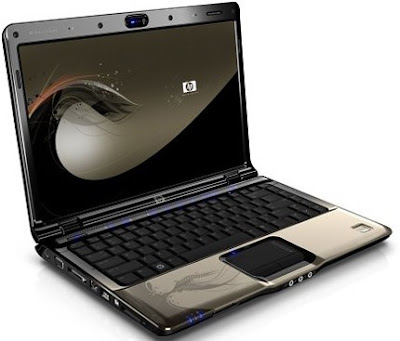
HP Pavilion dv2600 Notebook PC - PreviewFunctionally, there is little to differentiate the HP Pavilion dv2600 from the older dv2500 mode. Both are portable entertainment machines with a nice array of touch-sensitive multimedia controls and compatibility with the xb3000 expansion base. Digging a little deeper into the specification sheets, however, will uncover that the dv2600 uses the new range of Intel's T7000 series Core 2 Duo chip and that the memory can be upgraded to a maximum of 4GB (the dv2500 can accept only 2GB). There is even an option for a large 250GB harddisk in selected models.

But let's face it. The reason people will choose the dv2600 over the older dv2500 model is not because of this marginal improvement in specs. The key selling point is the HP Verve Imprint on the top cover. Unlike Dell and Sony which offer a range of colors for their new consumer line, HP has gone down another road by offering unique print impressions on the top cover.

Pros

When the Pavilion dv2000 series was launched over a year ago, it made in impression with its unique HP Imprint cover, curvy body and backlit touch-sensitive buttons. All these are still present in the HP dv2600, but the top lid has been redesigned with a limited-edition Verve imprint which adds brownie points to its aesthetic value.

HP Pavilion dv2600 Notebook PC - ReviewLooks aside, the Pavilion dv2600 has the performance needed to deliver quality entertainment. It's Core 2 Duo processor and discrete Nvidia graphics card allows high-definition content to be rendered with ease. There is even a mini remote control for use when the unit is at a distance. The Altec Lansing speakers give better audio output than most other thin-and-light units, though there are two headphone jacks (one of which is S/PDIF-compatible) for hooking up to external horns.

For those where video conferencing is a way of life, the built-in Webcam will certainly come in handy. The dv2600 includes almost all standard connectivity options like Wi-Fi, Bluetooth and Ethernet ports, making it suitable for normal everyday computing tasks.

Cons

Though we like the design, we have a problem with its size. At almost 40mm thick with a weight of 2.4kg, the dv2600 almost rivals some midsize machines when it comes to heft. The MacBook Pro, despite its larger 15.4-inch screen, is slimmer and almost as light as the 14.1-inch Pavilion.

With LCD TV becoming more prevalent, one of the key features for a serious entertainment notebook is the inclusion of a DVI or HDMI port. Though the dv2500 offers HDMI as an option (replacing one of the USB ports), the dv2600 is out of luck.

Bottomline

If you do not believe that personalization is a simple matter of colors, then the limited edition Verve imprint on the HP dv2600 might make the difference. Though it is a competent entertainment portable, the lack of a HDMI connection may be a deal breaker for some

HP Pavilion Slimline s3000y / S3000e Desktop

0 comments
HP Pavilion Slimline s3000
HP introduced the new Pavilion Slimline s3000y / S3000e series desktop PCs. The HP Pavilion Slimline s3000y is powered by an Intel Pentium 4 641 w/ HT 3.2GHz or Core 2 Duo 1.8/1.86GHz processor, up to 2GB of RAM, 160/250/400GB hard drive and integrated graphic card or a NVIDIA graphic card.
The HP Pavilion Slimline S3000e is similar to the s3000y but it is powered by an AMD Sempron 3600+ 2GHz or Athlon 64 3800+ or Athlon 64 X2 4200+ processor.
HP Pavilion Slimline s3000y is priced at $549.99 while the S3000e is priced at $499.99.

New HP Pavilion dv2600 Special Entertainment Notebook PC. Whew!

0 comments
HP%20Pavilion%20dv2600.jpg
Brown is rarely found on laptops these days, so it's refreshing to see that HP dipped into Adobe Illustrator's colourbox when designing this model, and chose something for their paintbrush other than 'black beauty', 'Mazda silver' or 'crimson lipstick'.
The HP Pavilion dv2600 Special Edition Entertainment Notebook PC (what a mouthful) isn't just about looks though. Oh no. It's also packing a 14.1" BrightView widescreen display, Core 2 Duo processor, 2048MB of RAM, a 160GB of hard drive, low-light webcam, stereo speakers, and comes bundled with a colour-coordinated wireless mouse and russet slipcase. It's 2.4kg in weight, and will be out before Christmas, at £999. And yes, that is a filigree flower pattern inlaid in the casing, and no, we won't be discussing that one here at Tech Digest

Latest HP Pavilion Entertainment PC – dv6500

0 comments
HP Pavilion Entertainment PC – DV6500 and other related laptops. I have tried to answer most the issues at the end of this post and in the comments section.
It’s been a while since I got my new laptop and I couldn’t post any details on that earlier. So here it is…
It’s a customized HP Pavilion dv6500 Notebook PC and I love it. I am a fan of HP and all the desktops and laptops that I have got so far are from HP. I love their sleek design!
HP Pavilion dv6500
Operating System : Windows Vista Home Premium 32-bit
Processor : Intel(R) Core(TM) 2 Duo processor T7300 (2.00 GHz, 4 MB L2 Cache, 800MHz FSB)
Memory : 2GB DDR2 (2 Dimm)
Display : 15.4″ WXGA High-Definition HP BrightView Widescreen Display (1280 x 800)
Graphics Card : 383MB NVIDIA GeForce 8400M GS with DirectX 10
Networking : Intel(R) PRO/Wireless 4965AGN Network Connection and Bluetooth(TM)
Hard disk : 120GB 5400RPM SATA Hard Drive
DVD Drive : LightScribe SuperMulti 8X DVD+/-RW with Double Layer Support
Battery : High Capacity 6 Cell Lithium Ion Battery
Other features :

HP Imprint (Radiance)
Fingerprint Reader,
Webcam,
Microphone ,
Remote Control.
Slots, Pins and other features on the Left Side:
Security cable Slot,
S-Video-out jack,
External Monitor Port,
Expansion Port 3,
RJ-45 (network) jack,
RJ-11 (modem) jack,
HDMI port,
2 USB port,
1394 port,
Digital Media Slot.
Slots, Pins and other features on the Right Side:
Express Card Slot,
Optical Drive,
USB Port,
Power Connector.
Slots, Pins and other features on the Front Side:
Power light,
Battery light,
Drive light,
Wireless Switch,
Wireless light,
Consumer infrared lens,
Audio-in (microphone) jack,
2 Audio-out (headphone) jack.
Windows Experience Index:
All the subscore including gaming graphics are above 4.3 but the graphics score for Windows Aero is only 3.2 and so the Base Score of Windows Experience Index is 3.2. Here is the list of subscore for all different parameters.
Processor (4.9) : Calculations per second
Memory RAM (4.8) : Memory operations per second
Graphics (3.2) : Desktop performance for Windows Aero
Gaming Graphics (4.3) : 3D business and gaming graphics performance
Primary Hard Disk (4.6) : Disk data rate transfer
Windows Experience Index

Saturday, October 2, 2010

Best Gaming Laptop Computers Buyer's Guide

1 comments

Are you in the market for gaming laptop computers? Do you need some advice on choosing a good laptop for your gaming needs?

Then you've come to the right place! Laptops are forever becoming more powerful, there's never been a better time to buy your new laptop.

This article will look into the various factors you should consider when buying your gaming laptop computer.


Screen Size

Choosing a screen size for your laptop depends on what you will use the laptop for. Avid gamers and those who wish to view DVD movies on their laptop will typically want a larger screen than normal computer users. Keep in mind that the larger the screen, the more you will pay. You could save quite a bit of money by going with a smaller screen, although if you're a diehard gamer this is probably not an option for you, as you will want the biggest screen you can get your hands on for a great gaming experience.


Laptop Video Card

Gamers will need a decent laptop video card inside their beast. ATI and Nvidia, the two best graphics card manufacturers in the world, both offer a range of different graphics cards made specifically for laptops. For example, ATI has the Radeon Mobility range of cards, while Nvidia offers the GeForce Go series of cards for laptops. Although laptop video cards don't match the performance of desktop video cards, the latest models can still pack a punch and are good enough for high performance gaming.
External video cards are also an option for you if you decide later down track that you want to upgrade your laptop's video card. Some external graphics cards can provide powerful, desktop-like performance.


Size and Weight

The size and weight of gaming laptop computers is important to buyers. If you will be travelling with your laptop and carrying it around a lot, a smaller and lighter laptop will be more convenient for you. Although, if you've chosen to go with a large screen size, then you don't really have the choice of buying a small laptop.

Laptop Keyboard and Mouse

The input capabilities of your laptop is another thing to look out for. The keyboard on your gaming laptop computer should be large enough for you to use it comfortably. If the laptop keyboard area and keys are too small, you may experience stress on your fingers and wrists when typing. The touchpad on the laptop, which is the alternative to using a mouse, should also feel comfortable to you. Many people dislike touchpads, as they are harder to control than a regular mouse. This may not be a problem for you as it's always possible to plug in your own external mouse for better control.


Battery Life

If you'll be on the move a lot, battery life may be an important consideration for you. Most laptops these days use lithium ion batteries. The performance of a lithium ion battery is judged by its capacity, which is measured in cells. Keep in mind that the more powerful gaming laptop computers drain their batteries faster. Keep in mind that there are some ways to extend laptop battery life.


Extra Ports

If you want to connect peripheral devices to your laptop, you will need to do so through USB ports. Devices such as printers, scanners, digital cameras, keyboards, and mice all need USB ports, so ensure that the laptop you choose has enough of these ports for your needs.

Conclusion

This article has looked at some of the important decisions you need to make when in the market for gaming laptop computers. Hopefully you now know a little more about what to look for in a laptop, and are better prepared to make a good purchase. You can find the best deals on gaming laptop computers hereicon.

Advertisement


Copyright 2008 All Rights Reserved Revolution Two Church theme by Brian Gardner Converted into Blogger Template by Bloganol dot com